Connect Condens to your AI assistants with Condens MCP
See how to bring customer insights into your AI assistants, custom company LLMs, and agentic workflows.

Condens has AI-powered search at several stages of your research workflow. This article explains where each one fits, how to get the most out of it, and how to write queries that give you useful results.
Here's an overview of the different types of searches in Condens:
Best for | Data searched | Follow-up questions | |
|---|---|---|---|
Home search | Exploring what your team knows across all research | Sessions, Highlights, Published Artifacts | Yes |
Session search | Deep analysis within a session, project, or workspace | Sessions within scope | No |
Participant profile search | Exploring everything one participant has said | Sessions and Highlights from that participant | No |
Highlights search | Making sense of what you've already tagged within a project | Highlights within a project | No |
Whiteboard clustering | Grouping and mapping themes or sentiment from tagged highlights | Highlights on the Whiteboard | No |
Magazine search | Browsing published, curated findings | Published Artifacts | Yes |
Now, let's dive deeper!
There are several places where AI search and analysis lives in Condens:
Home is your starting point in Condens. The AI search on Home lets you ask questions across your raw or validated data from the same place.
It's conversational: you can ask a question, get an answer, and keep going with follow-up questions. Use it to check what your team already knows about a topic before starting new research, or when you need a quick answer and aren't sure where to look.
You can specify whether the search should be limited to Sessions, Highlights, or Published Artifacts, and use filters to narrow down by project, tag, date, or other criteria. For broad workspaces, filtering your scope before searching helps you get more relevant results.
Click the  button to quickly create an Artifact from the response. Likewise, you can drag and drop any answer block into an Artifact.
Ask your Sessions, or simply put, AI search on raw data, lets you search across your raw session transcripts and notes. You can use it at three levels:
When you're inside a session, you're already working with a focused, defined set of data. Search here is straightforward; you can look for specific keywords or ask a natural language question, and the results are scoped to that session.
Searching at project level covers all sessions within that project. Since the data set is wider, it's good practice to combine your search with filters to keep your results relevant. For example, by participant type, date, or any custom metadata fields you've set up.
Workspace-level search is global AI search across all your raw session data. It's the most powerful scope and the one people find most useful for cross-study questions. Because the sample can be very wide, combining it with classic search filters makes a real difference to the quality of your results.
Each participant in Condens has a profile that collects all the sessions and highlights they appear in. You can run AI search directly from there to explore everything a specific participant has said across your research. This is useful when you want to understand one person's perspective in depth, or check how their feedback has evolved over time.
The Highlights page within any active  PROJECT collects all the excerpts you've tagged across your Sessions in one place. You can run AI queries directly on that set.
This is different from Ask your Session(s):
Session search works on raw data and is useful when you're exploring what's there.
Searching Highlights in a project is useful while you're still mid-tagging and want quick access to what you've pulled out.
Ask your Highlights works on data you've already reviewed and tagged, so it's most useful later in the process, when you've finished your sessions and want to make sense of what you've pulled out.
Once you've tagged highlights and pulled them onto a Whiteboard, AI-powered affinity mapping helps you group and explore them by theme, sentiment, or any framing you define. This is where synthesis starts, but you're working with evidence you've already selected, not raw transcripts.
You can also use Find similar highlights inside a cluster to pull in related evidence from elsewhere in your repository that you may have missed or tagged differently.
The Insights Magazine is where your team publishes final, validated research findings. AI search here works differently from session search: you're searching across concluded, documented insights, not raw transcripts. It's designed to work for stakeholders who want to easily explore and surface insights, and may not necessarily know the exact keywords or metadata behind this information.
This is the right place for:
Exploring what your team already knows — ask broader questions about your accumulated research knowledge, like "What have we learned about enterprise onboarding?" or "What do we know about user trust?"
Checking for research gaps — find out what you don't have documented yet, e.g. "Do we have any findings on how power users customize their workflow?"
Preparing for stakeholder conversations — surface relevant published findings quickly before a meeting or review.
These questions work here because the answers have already been synthesized and documented. If there's not enough data to answer, Condens AI will tell you so.

You can query your Insights Magazine directly from Slack or Microsoft Teams without leaving the conversation. This is useful when a stakeholder asks a research question mid-discussion and you want to surface a validated finding on the spot, or when you want to make research accessible to teammates who don't work in Condens day to day.
The search works the same way as in the Magazine itself: it searches across your published findings and links back to the source. For setup instructions and full details, see the Slack integration article and Teams integration article.
If your team uses AI tools like Claude or ChatGPT, you can connect them to your Insights Magazine through the Condens MCP server. This lets you query your validated research findings directly from those tools, making it easy to bring research context into wherever your team is already working. Furthermore, you can combine Condens data with other sources, like Notion, Jira, HubSpot, and many more, all within the same conversation.
For a full list of MCP-compatible tools and best ways to use these connections, check out the article below:
AI search builds lets you ask questions in natural language instead of constructing keyword queries. Rather than matching exact terms, it looks for content that matches the meaning of what you're asking and surfaces results backed by evidence.
Whatever AI search surfaces, you can always trace it back to the original moment in your data. Results are linked to their source so you can read them in context and verify them yourself. Where AI makes suggestions, nothing is applied without your input: you can accept, edit, or discard anything before it becomes part of your research.
When you ask a question, the AI looks through your data for moments, quotes, and content that are relevant to your question. It doesn't draw conclusions, form recommendations, or synthesize patterns on its own.
This means it works best when your question has a specific, concrete answer that exists somewhere in your data. The more you're asking it to interpret or conclude, the less reliable the results will be.
One thing worth knowing: the AI won't make something up just to give you an answer. If there isn't enough relevant data to respond to your question, it will tell you that directly. That's intentional. A non-result is still useful information. It tells you either that the topic hasn't come up in your research, or that you need to adjust how you're asking.
Some questions are genuinely large enough to be research projects on their own. "What are our biggest product problems?" or "What should we prioritize this quarter?" won't yield useful results unless someone in a Session explicitly stated those answers or you documented them in an Artifact. That's because the AI is looking for that answer in your data, not forming one. Those questions are better tackled through your analysis and synthesis work, where you can bring together evidence and draw your own conclusions.
Used for the right things (like finding who mentioned something, surfacing specific feedback, pulling together evidence around a concrete topic), AI search is fast and genuinely useful.
The right kind of question depends on what you're trying to find out. Here are the most common goals and what works well for each.
Use this when you're looking for something concrete: a quote, a reaction, a mention of a specific topic or feature. Session search, Participant profile search, and Home search all work well here. Keep your questions specific and use the language your participants actually used.
✅ "What did participants say about the checkout flow?"
✅ "Were there any moments where users expressed frustration with onboarding?"
✅ "Did anyone mention switching from a competitor? What did they say?"
✅ "Where did users struggle during the profile setup task?"
❌ "What do users think about our product?"
❌ "What are the main pain points?"
These broader questions work better as a starting point for your own synthesis. AI search is best at surfacing evidence, not drawing conclusions from it.
Use this when you want to understand what comes up repeatedly across multiple participants or sessions. Home search and workspace-level Session search work well here. The broader your data set, the more specific your question needs to be.
✅ "Which participants mentioned issues with the dashboard?"
✅ "What recurring feedback came up around the notification settings?"
✅ "Who asked for a dark mode, and in what context?"
✅ "What themes came up around collaboration features across Q1 interviews?"
❌ "What should we fix first?"
❌ "What's the most important feedback we received?"
The more you narrow your scope with filters before searching, the more relevant your results will be, especially across a large workspace.
Use this when you've finished a round of sessions and want to synthesize what you've pulled out. Ask your Highlights is the right surface here, since you're working with data you've already reviewed and selected.
✅ "What topics come up most often across these highlights?"
✅ "Are there any recurring frustrations in what I've tagged?"
✅ "What are the most common feature requests mentioned here?"
✅ "Cluster these highlights by theme."
❌ "What should I focus on?"
❌ "What are the main insights?"
Use this on the Whiteboard once you've pulled highlights together and want to explore structure. Clustering prompts can carry more context than a search question since you're giving the AI a frame for how to think about the material, not just matching keywords.
Simple, open-ended prompts work well when you want to explore broadly:
✅ "Group these by the type of problem described."
✅ "What are the main suggestions for improvement and areas of satisfaction in this feedback?"
More detailed prompts work well when you have a specific research context:
✅ "These highlights are from usability tests on our onboarding flow. Group the findings into areas of confusion, smooth interactions, and overall task success."
✅ "These are highlights from discovery interviews with first-time users. Group them by what surprised people, what felt familiar, and what felt missing."
Use this before starting new research to avoid duplicating work, or when a stakeholder asks a question and you want to surface what's already been documented. Home search and Magazine search both work here: Home if you want to search across everything (including raw data), and Magazine if a stakeholder needs quick answers based on validated findings.
✅ "What have we learned about enterprise onboarding?"
✅ "Do we have any research on why customers downgrade their plan?"
✅ "What do we know about how teams onboard new members?"
✅ "Is there any research on our mobile checkout flow?"
❌ "What should we research next?"
❌ "What are the gaps in our research?"
Phrase these as knowledge queries rather than analysis requests: "What do we know about X?" works better than "What should we do about X?" because you're looking for documented findings, not asking AI to form a recommendation.
Filter before you search
The broader your data set, the more a scoped query helps. Before searching at project or workspace level, apply filters by project, session, participant type, date, or custom metadata fields to narrow down to what's actually relevant.
Use specific language
Use the feature, flow, or product names your participants actually used. "Profile setup" will surface more relevant results than "onboarding" if that's the language in your transcripts.
Try rephrasing if results feel off
A slightly different question can surface different moments, especially if your participants used varied language to describe the same thing.
Follow the source links
AI search surfaces as much relevant evidence as it can, and everything links back to its source. Use it to get oriented and find the key evidence, then follow the source links to verify in context.
For Whiteboard clustering, try multiple prompts
Reapply clustering with different prompts to see how groupings shift; it's a good way to look at the same evidence from different angles. Start with an open-ended prompt to get an overview, then reapply with a more focused one to dig into a specific theme.
Search before starting new research
Use Home search or the Magazine to check what your team already knows before kicking off a new study. It's a quick way to find existing answers, spot gaps, and avoid duplicating research that's already been done.
You don't have to use AI search to find things in Condens.  Search is available at every level and gives you full control over your query.
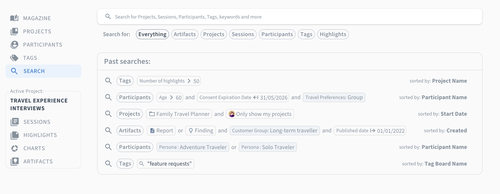
You can build complex searches using multiple keywords, apply filters, use and/or logic, and change sorting options to get a comprehensive view of your results. You can search across everything or scope it specifically to artifacts, projects, sessions, participants, tags, or highlights.
It's a good starting point when you know exactly what you're looking for, or when you want to combine precise filtering with an AI search on top.
