




New: Chat with your research and get instant answers sourced from your interviews, findings, and reports. Explore AI Chat
Benefits and Risks of AI in User Research Analysis

Benefits and Risks of AI in User Research Analysis

September 23, 2026
–

Our survey of 332 research practitioners shows that AI is actively being adopted for research analysis, but with real friction around quality and trust. That friction rarely comes from the tools themselves. Instead it comes from not knowing what AI is good for and where it needs oversight. That’s the skill this article aims to help build.

It looks at where AI genuinely adds value in the analysis workflow, where the risks are worth taking seriously, and what to look for when evaluating the tools available to you.

Benefits and Risks of Using AI in User Research Analysis

The benefits and risks of using AI in research analysis are often two sides of the same coin. The same capabilities that make AI valuable can also introduce new challenges if used without care.

This section examines four benefit-and-risk pairings in depth.

Benefits

  • Speed & Efficiency

    Speed is one of the most immediate benefits of AI-assisted analysis. Tasks that previously required hours of manual work can be completed in a fraction of the time and can be especially valuable as a first-pass filter of your data.

  • Scalability

    AI makes it possible to work with data volumes that would have been impractical to analyze manually. Teams that previously had to limit the scope of their research due to bandwidth can now work with richer and larger datasets.

  • Pattern Surfacing

    AI can surface patterns and connections across large datasets quickly. This can be especially helpful as either a first pass to help get the research started, or as a second pair of eyes to double-check your work.

  • Accessibility

    AI can help lower the barrier of entry for non-researchers to engage with data. Product managers, designers, and executives are more likely to participate in research when AI is there to support them. In principle, this makes research easier to access and incorporate into the decision-making process across the organization.

Risks

  • Accuracy and Reliability

    Surfaced patterns are only valuable if they’re accurate. Treat them as hypotheses to investigate, not findings to report. Always trace them back to the source data, and keep in mind that LLM training processes mean bias can be present in the output.

  • Verification Burden and ROI

    AI output should always be reviewed for errors and hallucinations. The key question when using AI in analysis is whether the time saved exceeds the time required to review the output. In some cases, doing the analysis yourself is actually faster.

  • Context and Data Limitations

    LLMs have finite context windows. When input approaches the limit, the model becomes selective about what data it references. Beyond that, UX work is deeply contextual. Accurate results require understanding of the product, users, business context, and research questions, context that’s difficult to fully supply in a prompt.

  • Overlooking Errors and Hallucinations

    AI-generated output is often delivered with confidence and eloquence, making it easy for less experienced people to overlook errors and hallucinations. According to research from OpenAI, “errors and hallucinations are fundamental to how LLMs are trained” and this risk increases with larger datasets.

icon lightbulb

Be cautious of claims that overstate what AI can reliably deliver. Claims like “instant insights”, “eliminates bias”, or “automated analysis” oversimplify what good analysis actually takes.

A Guide to Evaluating AI Tools and Their Safeguards

Research data is sensitive by nature. Participant data carries privacy obligations, and AI-assisted analysis introduces new questions about where that data goes and how it’s handled.

A benefit of working with a purpose-built AI research tool is that there are often safeguards built in to help mitigate some of the most common LLM-generated errors. Not all tools have the same safeguards in place, so when evaluating options, the questions below are worth asking.

  1. Can I control what data the AI draws from, and can I easily provide more context if needed?
    The quality of outputs depends heavily on this. A good tool should make it easy to define the scope of data the AI works with and to frame the question you’re trying to answer.

  2. What happens when the answer isn’t in the data?
    AI that fills gaps with plausible-sounding answers is more dangerous than AI that says “I don’t have that information.” Look for tools that are honest about their limits.

  3. Can I quickly verify where answers come from?
    Any insight or summary should be traceable back to the raw data it was drawn from. If you can’t check it, you shouldn’t trust it.

  4. Is it always clear what was generated by AI and what wasn’t?
    AI output should be clearly labeled so there’s never any ambiguity about what came from the data and what came from the model.

  5. Are AI features opt-in or opt-out?
    The researcher should always be in control of how AI is applied and should also be able to carry out tasks without AI involvement.

  6. Can the outputs be edited, accepted, or rejected at a granular level?
    This matters more than it might seem. Tools that let you act on suggestions individually keep judgment with the researcher. Tools that apply AI in bulk make it harder to catch mistakes and easier to let errors slip through.

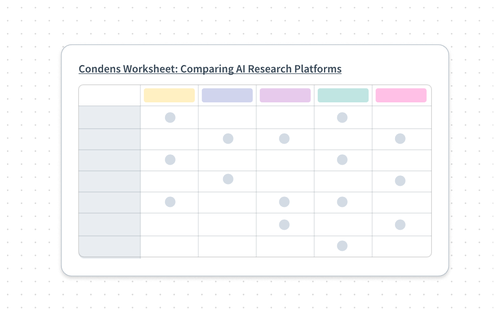
You can also use this worksheet to help keep track of your research when evaluating different AI UX research tools:

Condens Worksheet: Comparing AI Research Platforms

The answers to these questions look different across tools. To give a concrete sense of what strong safeguards actually look like in practice, here’s a closer look at how Condens approaches them.

Condens’ Approach to AI in UX Research

Building AI into a user research tool responsibly requires making deliberate choices at every level, from how data is handled to how outputs are labeled and what questions the AI is and isn’t allowed to answer. The following is an overview of the principles and decisions behind Condens’ approach.

Data Privacy and Ownership

Before using any AI tool with research data, it’s important to understand what happens to that data once it leaves your hands. Participant data shared in a research context is not data participants consented to contribute to AI model training.

Purpose-built research tools like Condens address this explicitly. General-purpose AI assistants often do not, unless you are using enterprise plans with clear contractual agreements in place.

There is also an important distinction between using data to generate outputs and using data to train a model. Condens takes a clear position on this: research data in the platform is never used to train LLMs, and contracts with AI providers explicitly prohibit them from doing so. You can think of it as a brain without memory: capable of reasoning over your data in the moment without retaining it afterward.

Knowing What AI Can and Cannot Answer

There’s a subtle distinction between the two types of questions that you can ask AI:

  1. Asking AI to find something (“What did participants say about onboarding?”)

  2. Asking AI to interpret something (“What is the most important point in this transcript?”)

The first has a retrievable, evidence-based answer. The second requires judgment beyond what’s in the data, the kind that the researcher is best equipped to make.

For stakeholders exploring insights with AI search, Condens can suggest a rephrasing of the question when what was originally asked falls outside the scope of available data.

Safeguards Built Into the Platform

To limit errors and hallucinations in AI-assisted analysis, Condens has built the following safeguards into the platform:

  • Explicitly states when information isn’t available: When AI-powered search is used to look up information that isn’t in the repository, Condens explicitly states that the information isn’t available instead of fabricating an answer. This directly limits the occurrence of hallucinations.

  • Controlled data scope: Users can precisely define the scope of data that AI can draw from by applying filters alongside their questions. This level of control isn’t reliably achievable with general-purpose LLMs.

  • Accurate, verified citations: Condens uses an evaluation pipeline to surface only the most relevant quotes, and post-processes supporting quotes to ensure they are accurate and correctly attributed.

  • Research-optimized model selection and prompting: Condens optimizes its model selection and prompts specifically for UX research contexts by running evaluations using test data.

  • Clear labeling and non-AI alternatives: AI-powered features are all clearly labeled, so you always know when AI is involved before using it. Any task can also be completed without the use of AI.

Understanding Who Will Be Using the Tool

icon lightbulb

When evaluating AI UX research tools, it’s important not only to ask, “How does this tool support researchers?” but also “How does this tool support non-researchers?”

There’s a clear and growing trend toward democratized research, and in many ways, this is a positive development. More people engaging with research means that there’s a higher likelihood that research will play a role in informing decision-making at every level of an organization.

But democratizing research also introduces risk. Less experienced practitioners are more likely to miss AI-generated errors and overlook the risks associated with different AI features, which can quietly undermine the reliability of insights flowing across the organization.

The AI tools you choose will directly shape the quality of research being done across your organization, not just by your research team. That makes tool selection a decision about research culture as much as it is about features and functionality. Speed and efficiency matter, but not at the expense of trustworthiness and reliability. Choose tools that make responsible, evidence-grounded work accessible to everyone who uses them.

„Instead of thinking about how AI will work for an experienced star researcher, you want to think about someone junior who may not even be a researcher.“

Researcher & Founder at Llewyn Paine Consulting

Do’s and Don’ts Checklist

When using AI for user research analysis, there are best practices as well as things that shouldn’t be done to uphold the reliability and trustworthiness of the results that will be produced and used. Here’s a checklist of dos and don’ts with input from user research experts including Nick Babich, Laura Klein, Maria Rosala, and Llewyn Paine.

Do’s

  • Start with clean data

    Irrelevant interviews, wrong participants, or incomplete data can result in misleading and biased AI output, so keep your data clean.

  • Use AI to escape the blank canvas

    AI is great for brainstorming research questions, drafting discussion guides, and suggesting study designs, but stay in control and vet its suggestions. Always refine what it generates before using it.

  • Use AI to challenge your analysis conclusions

    Prompt it to find contradictions in the data or point out weaknesses in your reasoning. It’s a solid thinking partner for catching blind spots.

  • Take full advantage of AI for scoped tasks

    Transcription, searching for relevant quotes, suggesting tags, and initial clustering are all areas where AI adds clear value. The more specific the task, the better the output.

  • Validate AI output with human judgment

    AI can miss nuances like sarcasm, idiomatic expressions, and emotional subtext, and can produce sycophantic or biased responses. People often say one thing and mean another. Always review tags, clusters, and summaries rather than accepting them at face value.

  • Use AI for meta-analysis of past research

    Let AI suggest tags, find patterns across studies, and surface insights from untagged data. But don’t hand off the full tagging process. Deep familiarity with your data is what makes themes meaningful.

  • Make every AI insight traceable

    Always verify AI-generated quotes against original transcripts. LLMs can misconstrue, misattribute, or cite irrelevant quotes. Be clear about how AI was used and who owns the insights.

  • Choose tools that support responsible research

    As AI lowers the barrier to doing research, make sure non-researchers are guided by tools and safeguards that encourage meaningful, responsible work.

Don’ts

  • Don’t assume AI eliminates bias

    LLMs are trained on biased data and can’t follow up the way a trained researcher can. Bias doesn’t disappear because AI is involved.

  • Don’t let AI shape your research process on its own

    A faulty research process can lead you down the wrong path from the start. Don’t blindly trust AI-generated tasks or interview questions. They can be leading, inappropriate, or constrained by the tool’s framework.

  • Don’t replace collaborative analysis sessions with AI reports

    Co-creating insights during collaborative stakeholder sessions (e.g. watch parties) helps build team consensus and drives organizational change. AI can’t replicate that.

  • Don’t feed transcripts into general AI tools without checking privacy

    Unless you have participant consent and have removed all PII, this may overstep privacy laws. Research-specific tools offer better protections and more accurate results.

  • Don’t hand all your data to AI and expect real insights

    AI can produce insight-shaped things that look convincing but lack depth. It doesn’t know your product or your users, and the more it interprets, the higher the risk of hallucinations and missed nuance. Don’t let it decide what matters, especially for critical decisions.

  • Don’t replace real users with AI-generated synthetic users

    Synthetic users have no real experiences and are hard to follow up with meaningfully. Using them as a substitute can multiply systematic mistakes and create false confidence in wrong conclusions.

  • Don’t rely on auto-generated reports for complex or high-stakes decisions

    AI can produce outputs that look convincing, but they often lack the context and judgment that come from human analysis. And without clear ways to verify how conclusions were reached, it’s hard to assess their accuracy or trustworthiness.

  • Don’t assume AI tools are all the same

    Evaluate tools carefully. AI is non-deterministic and makes different mistakes each time, so don’t judge a tool on a few quick prompts.

Go Deeper on AI in User Research Analysis

AI can take a lot of the mechanical work off your plate, but the parts that make analysis trustworthy, like judgment, context, and interpretation, still depend on you. Knowing where that line sits, and choosing tools that respect it, is what lets you get real value from AI without compromising the credibility of your work.

If you’d like to dive deeper, check out our free guide. It explores what good analysis looks like with and without AI, what 330+ research practitioners told us about how they use AI today, and how common AI features rank on risk, from transcription to report generation. You’ll also find a stage-by-stage, human-in-the-loop workflow for AI-assisted analysis, plus a case study on how UX researcher Michaël Dufranne uses AI to save three days per study.


About the Author
Phillis Haňo

Phillis is a Content Marketing Strategist at Condens. As a content creator, she produces both long and short-form content in various formats, from blog articles and social media posts to video snippets. She is passionate about ensuring that her work is high-quality and strives to publish content that is both informative and actionable for the UX research community.


Want to receive UX Research Meetup & Event guides, new content and other helpful resources directly to your inbox? Enter your email address below!