The AI Delegation Guardrail Framework
Want to dig deeper? Check out the full guide for more details on deciding where AI fits and where it doesn’t.
(opens in new tab)

“Should we use AI for analysis?”
Every research team I know has had some variation of this conversation, and most go nowhere. One side worries about hallucinated themes and flattened nuance. The other sees hours of coding and analysis that a model could take off their plates.
The thing is that both sides have a point, which is why this debate tends to stall. The problem with asking an overarching question like, “should we use AI for analysis?” is that it pushes a team toward blanket resistance or blind adoption. To have a productive conversation about AI, the questions you ask need to be scoped and lead to actionable decisions.
That’s why I designed a workshop around three more targeted questions:
Which parts of our work should AI automate?
Where should it assist?
What should never be delegated?
I ran this workshop with my team and we mapped our workflow, broke it down into individual tasks, and wrote a guardrail for each one. In this article, I’ll cover what we built, what the results showed us about our own work, and how to run the same exercise with your team to figure out where AI best fits into your own work.
We divided every task in our workflow into one of three AI delegation levels.
Automate: Repetitive, low-risk work that AI can take care of with minimal oversight. These tasks follow stable rules, are not interpretive, are easy to verify, and can be reversed if something goes wrong.
The researcher sets up the task, defines what an acceptable result looks like, and decides which exceptions should get escalated to a human.

Key question for this level: Would it be acceptable for AI to handle most of this task as long as exceptions were escalated?
Assist: AI helps draft, organize, or surface options, while a researcher reviews the output and makes the call. This is work that benefits from a faster first draft, but that may contain ambiguity, and needs to be validated in order to be fit for feeding downstream decisions.
Key question for this level: Can AI provide useful output without being allowed to decide whether it’s correct?
Never Delegate: This is usually high-stakes work where judgment, context, accountability, or ethical responsibility must stay with a human. These tasks decide what evidence means, whether it’s sufficient, who takes part in a study, or which strategic direction the organization should take.
Key question for this level: Would delegating this decision weaken trust, quality, fairness, or accountability?
And just to clarify (because this question always comes up), Never Delegate doesn’t mean AI is banned from the task altogether. AI can still be used to help gather information or suggest possibilities. It just shouldn’t hold decision-making authority or be able to validate its own work.
After sorting the tasks into their respective AI delegation levels, the next step is to set up guardrails by laying down the conditions for using AI in each task.
Here’s an example of how we laid out the condition for the task, “identify possible themes”.
Task | AI may help… | As long as a researcher… |
|---|---|---|
Identify possible themes | generate candidate themes from coded data or observations | validates those themes against the underlying evidence before treating them as findings |
Laying down clear conditions ahead of time is important because the conditions become the backbone of your guardrails and are what make them work.
A useful condition is one that clearly lays out:
After mapping out our workflow, we were able to divide it into 13 stages:
Stage | Description |
|---|---|
Intake | Understanding stakeholder requests and product questions |
Scoping | Deciding whether research is needed, along with its prioritization |
Planning | Creating research plans, timelines and success criteria |
Recruiting | Defining participants, screeners, outreach and schedules |
Study Design | Writing guides, tasks, surveys and prototypes |
Data Collection | Conducting interviews, usability tests, surveys and other methods |
Notes & Transcripts | Capturing observations, quotes, behaviors and usability issues |
Analysis | Tagging, coding, clustering and comparing patterns in the data |
Synthesis | Turning observations into themes and insights |
Recommendations | Translating findings into product and design suggestions |
Readout | Creating decks, narratives, clips and summaries |
Repository | Storing, tagging and making sure research is reusable |
Follow-through | Tracking how/whether insights influenced decisions |
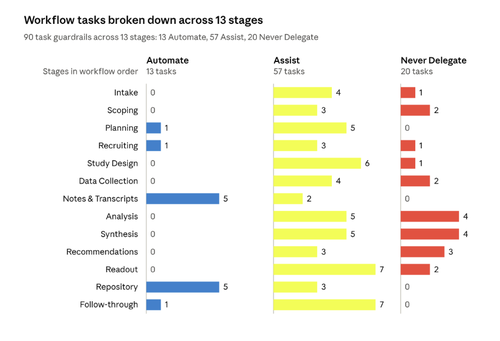
Within these stages we identified 90 tasks and wrote a guardrail for each one, resulting in a final count of 13 tasks to automate, 57 to assist, and 20 to never delegate.
Assigning precise conditions to the tasks in the Assist level is crucial because vague conditions tend to lead to thin reviews, which in turn can lead to AI output being taken as the final answer.
To combat this, what it means to “review AI output” needs to be clear. It can’t just mean skimming a draft and approving it. A review needs to include checking AI output against the source material. Until that’s done, AI output should only be considered a draft.
Most of our Automate tasks cover two stages in our workflow: Notes & Transcripts and Repository. These include tasks like cleaning and formatting raw notes, standardizing them into templates, and applying a predefined tagging scheme.
Here too, laying down precise conditions is key to setting guardrails that give AI enough structure to successfully carry out tasks.
Notably, none of the tasks that require interpretation (in stages like Analysis, Synthesis or Recommendations) made it into the Automate level.
These are the tasks that require more sense-making and shouldn’t be automated away. Specifically, there are two lines that AI shouldn’t cross:
AI must not validate its own analysis. If AI suggested the themes, asking it to confirm them on its own just runs the same reasoning again. A researcher needs to go back to the transcripts and notes to check that the themes hold up against the source evidence.
AI must not decide what’s worth focusing on. Whether a finding should be escalated as a recommendation or not depends on several factors, like business context, which the AI may not be privy to. That’s why a researcher needs to be the one to decide what’s actually important.
It’s not always easy to decide which level a task belongs to. So when we aren’t sure, we park the task in what we call the Gray Area and come back to it again after our first pass through all the tasks.
To be clear, this Gray Area shouldn’t be considered a fourth delegation level. It’s a temporary holding category for unresolved decisions, and the tasks that fall into the Gray Area should ultimately be sorted into either the Automate, Assist, or Never Delegate levels.
Whenever a new task comes up, we ask ourselves two questions to figure out where it belongs:
Who answers for it if the output is wrong?
Is the task organizing evidence, or deciding what the evidence means?
For harder calls, it helps to look at the task across six dimensions:
Consequence: how much an error matters
Judgment: whether rules or interpretation decide the answer
Verifiability: how quickly accuracy can be checked
Reversibility: how easily the result can be corrected
Sensitivity: whether the data is confidential, personal or regulated
Accountability: whether someone has to explain and defend the outcome
A task belongs in Automate only if it’s low-risk across all six dimensions, and exceptions can be detected and escalated.
At the other end, a task belongs in Never Delegate if it decides something about a person, makes a final call on validity or risk, sets strategy, depends on empathy or real-time judgment, or produces results that can’t be meaningfully verified.
Anything that doesn’t meet either set of criteria goes into one of two places. If we’ve determined that human review of the output is enough to manage the risk, it goes into the Assist level. Otherwise, it temporarily goes into the Gray Area until its risks and conditions are better understood.
When in doubt, we tend to default to putting tasks into the level that is more restrictive and only move it once there’s evidence that its risks are under control.
The goal of this workshop isn’t to conclude whether your team should or should not use AI. It’s meant to help you:
Create a task-level library of guardrails with explicit conditions so that AI can be used responsibly.
Support your team’s broader AI strategy including decisions about tools, workflows, and ongoing governance.
You can get a first version in one session in approximately 60 minutes if your team already has a shared workflow map, and 90 if you need to build one.
Activity | 60 min | 90 min |
|---|---|---|
Purpose and definitions | 5 | 15 |
Map workflow stages | — | 20 |
Build the task inventory | 10 | 15 |
Sort the task cards | 15 | 15 |
Discuss Gray Area tasks | 15 | 12 |
Draft guardrail statements | 12 | 10 |
Assign owners and follow-up | 3 | 3 |
To get started, set up a shared workspace with an area for each workflow stage and four sorting areas: Automate, Assist, Never Delegate and Gray Area.
Then work through the following three activities.
This activity gives your team a shared map organized by the major stages of your workflow. If you already have a workflow map, bring its stages into the session and review them briefly. If not, build one together first.
The goal is to come up with a reasonably complete list of tasks, broken down far enough that each one can be sorted on its own.
Determine where your workflow begins and ends
Divide it into its major stages (keep the stages broad enough to describe the whole workflow without turning every activity into its own stage).
Ask your team to list out the tasks they perform in each stage.
Write each task on a card in the format Stage: Task (e.g., Analysis: Cluster observations).
Review the cards for missing, duplicate, or overly broad tasks.
Break down any broad tasks into smaller ones if they can be reasonably sorted into different AI delegation levels.
In this activity, you’ll classify each task by how much authority should be given to AI. Try to keep a good pace during this activity and put the tasks you aren’t sure about in the Gray Area to come back to later.
While sorting the tasks, here are some questions you can ask to help sort them into the right levels:
Automate:
Is the task repetitive, mechanical or governed by stable rules?
Can the output be checked quickly?
Would an error be limited, detectable and reversible?
Can exceptions be identified and sent to a person?
Would it be acceptable for AI to handle most of the task?
Assist:
Can AI provide a useful draft, option, summary or starting point?
Does a person need to validate the output against source evidence?
Does the task contain ambiguity or require contextual interpretation?
Can AI contribute without being allowed to make the final judgment?
What specifically must the reviewer examine or decide?
Never Delegate:
Does the task determine what evidence means?
Does it establish whether evidence is sufficient or trustworthy?
Does it require ethical, strategic, relational or professional judgment?
Could the decision materially affect a person, customer, employee or user group?
Must someone be able to explain and defend the decision?
Would delegating it weaken trust, quality, fairness or accountability?
For this activity, start with the clearest or highest-priority tasks. You likely won’t finish drafting all your guardrails in one session, so no need to put that expectation on yourself.
The goal of the first session should be to establish an initial working set of guardrails, and a repeatable method for drafting the remaining ones.
When drafting your guardrails, your statements can follow these three sentence patterns:
Automate: AI may automatically [perform task], as long as [required controls, boundaries, and escalation conditions].
Assist: AI may help [perform task], as long as [accountable person] [reviews, validates, or decides specific things].
Never Delegate: AI must not [make decision or exercise authority], because [human judgment, ethical responsibility, or accountability].
Before accepting a statement, check to see that:
It describes one recognizable task
It’s clear about the amount of authority that AI has
It clearly states the condition in which using AI is acceptable
Someone could actually use this statement to guide their workflow
It’s a statement you’d be comfortable defending to leadership or the affected stakeholders.
At the end of the workshop you should have four artifacts:
A workflow task map with a list of the workflow stages and tasks
An AI delegation inventory with all the tasks classified
A first guardrail library with the approved Automate, Assist, and Never Delegate statements
A Gray Area list where open questions have an assigned owner and a resolution date.
This methodology for mapping out your workflow and determining which tasks should and should not be delegated to AI isn’t specific to research. Any function can make use of it and sort out their tasks in the same way.
Here are a few starting points for different teams:
Product: AI can help format status updates from approved roadmap and ticket data, or draft requirements. It shouldn’t set product strategy or decide which customer needs deserve priority.
Design: AI can resize approved assets or generate layout alternatives. The final judgment on whether a design is fit for use, however, should stay with the designer.
Engineering: AI can draft code, tests or implementation options for review. But it shouldn’t have the authority to accept security risks or approve a consequential production change without accountable human review.
People/HR: AI can coordinate routine scheduling or draft communications. Hiring, promotion, performance, compensation and disciplinary decisions on the other hand should never be delegated.
These are just starting points and not universal rules though. The same task can move between AI delegation levels for different teams depending on the context, the data involved, and who might be affected.
A guardrail library that sits in a shared drive won’t change how anyone works. That’s why we implemented three habits on our team to keep ours alive.
Put the conditions where the claims are. We added a “researcher validated against source” field into wherever a claim will travel (e.g., synthesis templates, the repository field, and the readout checklist).
Judge based on more than speed. Improved efficiency alone is not evidence that AI has made things better. That’s why we judge AI’s impact on more than just how much faster the analysis process is. We also check its impact on research quality, rigor, trust, and error rate.
We even made this into a guardrail: AI may help track changes in speed, throughput, and effort, as long as a researcher evaluates the effects on quality, rigor, trust, judgment, and error rates.
Regularly check whether tasks should be reclassified. AI capabilities will keep changing, so your library also needs to be regularly reviewed.
A task should only be moved into categories allowing for more AI automation when:
The quality of the AI output is shown to work in actual working contexts
Errors are observable and controllable
The output can be meaningfully reviewed
Data handling is approved
A person still owns the outcomes
A task should be moved into categories allowing for less AI automation when:
The stakes are higher than they were before
More sensitive data comes in
The ability to verify results gets weaker
People start taking AI output as the authority without reviewing it
AI tools will keep getting more capable, and tasks will move between the three categories as they prove themselves in practice. But what should never change is human accountability, and that’s the line our guardrails are meant to hold.
AI can help accelerate the work, but a researcher still needs to stand behind the results.

Greg Hoskins is a Senior Manager of UX Research at Aya Healthcare, where he works to expand the reach and influence of research across product and strategy decisions. He is passionate about advancing research maturity, creating better experiences for healthcare workers and Aya employees, and helping teams use AI responsibly while preserving rigor, human judgment, and accountability.