Automate data flows and build custom integrations with the Condens API

Automate data flows and build custom integrations with the Condens API

April 21, 2026

Every research team works inside a larger system. You have CRMs, survey platforms, internal databases, ticketing tools, knowledge bases, and a hundred other places where relevant data lives or needs to land. But getting data flowing between these systems often meant manual work.

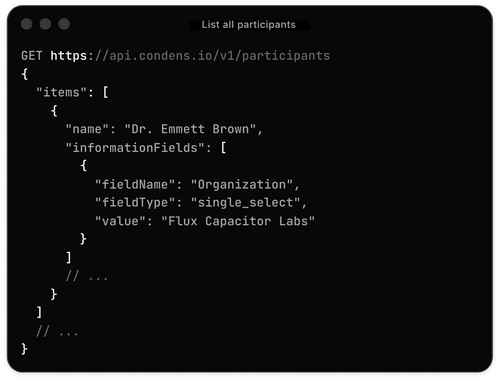
The Condens API is a REST API that gives you a direct, programmable connection to your Condens workspace, so you can automate data flows, build custom integrations, and connect customer insights to the tools your team already uses.

Let’s dive into this product update!

What an API actually is (and why it matters here)

If you're not a developer, "REST API" might not mean much. Here's the short version.

An API is a standardized way for two software systems to talk to each other. When you connect your calendar app to Zoom so meetings appear automatically, or when Slack sends you a notification about a new comment in Figma, that's an API at work. One system sends a request; the other responds. No human in the loop.

A REST API is simply a widely-used, reliable style of building those connections. It means any developer, and any tool that supports REST, can integrate with Condens using standard methods they already know.

For research teams, this matters for one reason above all: your research doesn't live in a vacuum. Data comes from survey tools, support conversations, recruiting platforms, interview recorders, and internal databases. Findings need to reach Notion, Confluence, dashboards, and AI assistants. The more friction there is in moving data between systems, the more research value gets lost in transit.

If you've found yourself manually moving data between tools, or wishing your research findings could reach more places without extra steps, this is for you.

That said, you don't need to be an engineer to benefit. Many workflows can be set up through no-code automation tools like Zapier, Make, or n8n, using the API as the connector. If your team has engineering support, the options are considerably broader.

What Condens API enables

There are four main things you can do with the API. Most teams will start with one or two areas, but they all work together.

Bring data into Condens

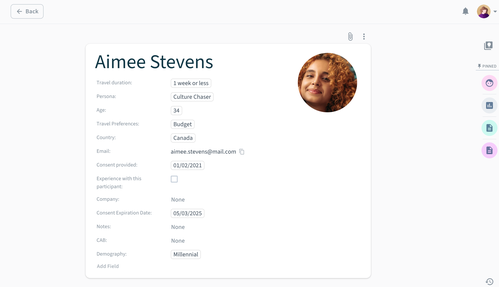
You can create and manage the full structure of your research repository through the API: projects, sessions, participants, and all the information fields attached to them. That means any external tool that generates research-relevant data can feed directly into Condens without manual steps.

  • When creating or updating a session, you can bring raw data directly into it, whatever format it comes in. Text-based content like survey responses, interview notes, or exported documents can be imported as-is, with any existing formatting preserved.

  • For recordings, you give the API a link to where the file lives, and Condens retrieves and stores it on your behalf, even if it's in private or authenticated storage. As part of the same request, you can switch on transcription with your preferred settings and apply anonymization, so the recording arrives in Condens already processed and ready to work with.

Across all of this, you can set the full session metadata (date, participant links, researcher assignments, custom information fields) at the same time, or add to it later as the project evolves. The result is a research repository that stays up to date on its own, without anyone manually moving data between tools.

Sync participant data

Participant records don't have to live in two places anymore. The API lets you create, update, and (where needed) delete participants in Condens, so your CRM or recruiting database and your research repository can stay in sync. You can also retrieve participant data from Condens, for example a list of every session someone participated in, which is useful for tools that track research engagement over time.

Get Condens data into the rest of your tool stack

This is where the API starts to feel genuinely powerful for teams thinking about research at scale. The API lets you pull artifact data, including titles, types, summaries, and publication status, into other systems automatically. Think of it as connecting Condens to your organization's broader knowledge infrastructure: your internal wiki, your data warehouse, your stakeholder dashboards, or anything else that stores or displays information your company relies on.

For example, when a new artifact is published in Condens, the API can trigger an event that sends that information wherever it needs to go, without anyone doing it manually. For teams with compliance or data governance requirements, the same logic applies to automated data exports and local backups.

Build custom integrations

Some workflows are too specific for off-the-shelf integrations to cover. Maybe you have an internal tool that doesn't exist in any marketplace. Maybe your research process involves a combination of steps that no automation template accounts for. The API is the foundation for building exactly what you need, whether that's a full integration with a proprietary system or a small script that handles one recurring task your team does every week.

What you could build with Condens API

The Condens API works with any other tool that has an API of its own, which covers the vast majority of software your team is already using. There are no preset integration paths you have to follow. The API documentation gives you the full set of available endpoints and what each one does, and from there, what you build is entirely up to you.

To make that a bit more concrete, here are a few workflows that are now within reach:

  1. Auto-import survey responses
    Connect your survey tool to Condens so that each new response automatically creates a session, complete with the response content and any relevant metadata as Session Information Fields. Works with tools like Qualtrics, Typeform, and Mopinion, or any survey platform that has its own API.

  2. Keep your participant database in sync
    If your team manages a research panel in a CRM or a custom database, use the API to sync changes both ways. A new recruit can get added in Condens automatically when they enter your CRM. Research activity in Condens flows back to their record.

  3. Push research into your knowledge base
    When a new artifact is published in Condens, push a summary and link to Notion, Confluence, or your internal wiki. Stakeholders who never log into Condens stay connected to what your research team is learning.

  4. Build a research dashboard
    Pull artifact and session data from Condens into a custom dashboard that gives leadership a live view of research activity, themes, and coverage across your product areas.

  5. Power internal AI tools
    If your organization is building or using internal AI assistants, the Condens API gives you a way to connect those tools to your research findings. Ask questions, retrieve context, surface relevant past research, all programmatically.

  6. Bring support conversations into your research repository
    Automatically create sessions in Condens from support tickets or customer conversations in tools like Zendesk or Intercom, so your team can analyze support patterns alongside traditional research data. Both tools have APIs, so no manual export is needed.

Getting started

Condens API is available in the Enterprise plan. You'll find API key management in your workspace settings under the Condens API & MCP section. Only admins can create and manage API keys. Once you have a key, you can point it at the base URL shown in your settings and start making calls.

Explore the full API documentation, including the complete list of available endpoints, example requests, and response formats. If you have a workflow in mind and aren't sure where to start, reach out. We're happy to help.


About the Author
Iva Anusic

Iva is a Senior Product Marketing Manager at Condens, driven by a deep curiosity about what makes customers tick—their goals, struggles, and what helps them succeed. She thrives in the sweet spot between product, marketing, and sales, turning insights into action with a hands-on, collaborative approach. Outside of work, she enjoys unwinding with her dog.


Want to receive UX Research Meetup & Event guides, new content and other helpful resources directly to your inbox? Enter your email address below!