
Anonymize and Redact Research Data Without Losing Context
Research runs on trust. Participants share screens, faces, voices, and stories on the understanding that you'll handle all of it with care. But that same richness is what makes research data sensitive. A face in a clip, a name said out loud, or a document visible in a screen share can identify someone the moment you share a recording beyond the room it was captured in.
The usual fix is to strip that material out, which often means stripping out the nuance too. Condens' anonymization and redaction tools let you protect participant identities by blurring faces, names, or entire videos, anonymizing voices, and manually redacting text, audio, or video, so you can meet strict privacy and compliance standards without losing the context that makes research meaningful.
Let's dive into this product update!
- Anonymize research data without losing the moment
- Protect identities across a whole recording
- Blur faces (Beta)
- Blur names (Beta)
- Blur the entire video
- Anonymize voice
- Redact the sensitive moments, in the recording and in your notes
- Manually redact PII
- Automated PII redaction
- Bulk anonymize and redact sensitive information
- A workflow your legal and security teams can get behind
- How anonymization fits into different research settings
- Getting started
Anonymize research data without losing the moment
If you've ever hesitated before sharing a clip with stakeholders, you already know the tension. The footage is compelling, but it shows a participant's face, or they mentioned their employer, or there's a customer record visible on the screen they shared. Sharing it as-is feels risky, but cutting it feels like a loss.
So most teams reach for a workaround. They pull the file into a separate video editor, blur or cut by hand, export it, and bring it back, losing the link to the transcript and the analysis it came from along the way. Others skip rich media altogether and fall back on written notes. Either way, the friction is enough that sensitive data often just stays put: locked in the researcher's head or buried in a private folder. The insight never travels, and the participant's voice never reaches the people making decisions.
There's also the compliance side. Depending on your industry and region, you may be working under GDPR, HIPAA, or internal data governance rules that require you to minimize or remove personally identifiable information (PII) before research data moves through your organization. For many teams, anonymization isn't a nice-to-have, but rather the condition that determines whether a recording can be used at all.
Anonymization in Condens is built to resolve that tension rather than force a trade-off. You protect the identity and keep the moment.

Protect identities across a whole recording
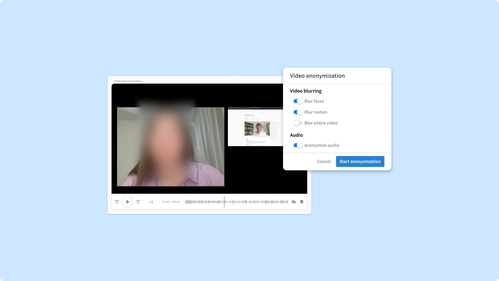
Some recordings need protection from end to end. For those, Condens gives you four ways to anonymize a full file, applied right where your data already lives, with no external software in the loop. You can turn them on as you upload a recording or apply them to one that's already in your repository.
Blur faces (Beta)
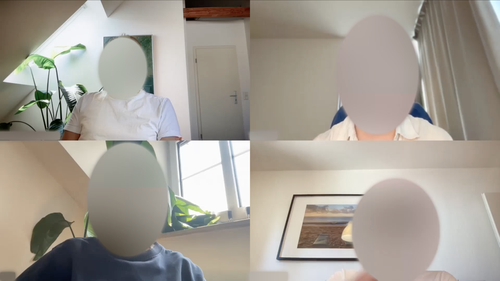
You can hide identities while keeping the visual context that makes a clip compelling: gestures, reactions, body language. You see the interaction, just not the identity.
Blur names (Beta)
Faces aren't the only thing that can identify a participant on screen. Tools like MS Teams often burn a participant's name into the video itself, as an on-screen tag, and that stays fully visible even after their face is blurred.
Blur names covers exactly that: on-screen name tags, alongside faces or on their own. It's another way to make sure the identity a recording carries isn't limited to what's said in the transcript.
Blur the entire video
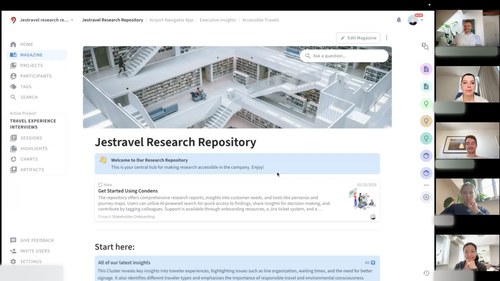
Blurring the whole video goes further, for the cases where even a background detail or a shared screen could reveal something sensitive. Use it when the safest choice is to remove all visual information at once.

Anonymize voice
Voice distortion protects the speaker while preserving how something was said. A participant's tone often carries as much signal as their words, the frustration in a sigh, the hesitation before an answer. Voice anonymization lets you share those moments without exposing the person behind them.
The result is footage you can actually share. The reactions, the friction, the emotion all stay intact, while the person behind them stays unidentifiable.
Redact the sensitive moments, in the recording and in your notes
Often a recording is fine to share except for one stretch: a participant says their full name, reads out an account number, or talks through something that could identify them. Anonymizing the whole file would mean losing valuable visual or auditive context. Instead, you can redact only the parts that matter.
Manually redact PII
You can hide sensitive text, mute a section of audio, or blur a stretch of the video, so the moment is gone while everything around it stays available to your team.
What's easy to miss is how far the text redaction reaches. A Session in Condens isn't only a transcript. It often holds context you've added yourself in a Notes section: an intro to the interview, your research guide, observations from live notetaking, or background on how the session fit into the wider study. Any of that can name a person, a company, or a group in a way that's just as identifying as anything said out loud. Redaction works across all of it, not just the transcript, so PII you wrote into your own notes is covered alongside what was spoken in the recording.
And because redactions carry through to any clips that include those moments, something you've hidden won't quietly resurface in a Highlight you created earlier. It all happens inside Condens, so there's no exporting, editing elsewhere, and re-importing just to clean up a few seconds of a session or a line in your notes.
Automated PII redaction
Manual redaction works well when you're clearing a single sensitive line. It gets harder to sustain across a whole study, when the same categories of information (a name, an email address, a banking detail) show up again and again across Sessions, and someone has to catch every instance by hand.
Automated PII redaction in Condens finds and removes personal information for you. Point it at a Session and choose which information to detect: names, dates of birth, age, nationality, social security numbers, passwords, blood type, phone numbers, email addresses, banking information, credit card numbers, and organization names. Condens will flag every instance it finds, and you decide how hands-on you want to be:
Auto-apply detects and redacts everything you've selected automatically, no review needed.
Suggest keeps you in the loop. Review redactions individually, by category, or accept or dismiss them all at once.
Either way, nothing gets removed without your say. You get the speed of automation and the confidence that what dissappears is actually meant to.
Bulk anonymize and redact sensitive information
Have you ever found yourself in a situation where a client's legal team asked for a fully anonymized archive or a compliance review lands next week, and you're dealing with fifty Sessions of backlog?
Bulk anonymize applies anonymization and redaction across many Sessions in a single pass. Select multiple Sessions, or an entire Project, choose which anonymization and redaction options to apply, and Condens runs them across everything you selected at once.
That's what turns a compliance backlog from a week of clicking through Sessions one by one into a single action, and it's what makes getting a whole Project share-ready realistic, instead of a job you keep putting off.
A workflow your legal and security teams can get behind
Anonymization is rarely just the researcher's concern. The people who decide whether research media can be stored, shared, or kept at all are often in legal, security, or data protection, and their answer usually comes down to how much PII is exposed and how well you can control it.
Keeping anonymization inside Condens makes that conversation easier. Sensitive media never has to be downloaded to a laptop, passed through a consumer editing app, or emailed around for cleanup, each of which is a moment where data can leak and a question your security team would rather not have to ask. The recording stays in the same governed environment where the rest of your research lives, and the edits happen there too.
That also helps with the promises you make to participants. When you tell someone their data will be handled carefully and their identity protected, anonymization is how you keep that promise in practice, not just in the consent form. Being able to point to a concrete, repeatable way you remove identifying information is exactly the kind of evidence that makes a data protection review go smoothly.
How anonymization fits into different research settings
The right level of anonymization depends on what you captured and where it's going. Here's how these tools fit into the situations researchers run into most.
Sharing usability clips with stakeholders
You ran a round of usability tests and want to show the product team exactly where users got stuck. The clips are perfect, but they show participants' faces and you don't have consent to share their identities internally. Blur faces lets you send the footage to the team with the friction and reactions fully intact, while the participants stay unidentifiable.
Doing research in regulated industries
You're studying how clinicians use a tool inside a hospital, and recordings may capture patient information on screen or names spoken aloud. Blurring the entire video for the sensitive segments, combined with targeted redaction of the moments where identifying details appear, lets you keep the research usable while staying inside HIPAA or internal compliance boundaries.
Quoting a participant without exposing them
A participant gave you a powerful quote about a frustrating experience, and the way they said it matters as much as the words. You want it in your report, but the participant asked to stay anonymous. Voice anonymization lets you share the audio with its full emotional weight, without making the speaker recognizable.
Working with sensitive topics or vulnerable participants
You're running interviews on a difficult personal subject, and protecting who took part isn't optional. Combining face and voice anonymization lets you keep the human texture of what people shared, the emotion and the detail that make the findings land, while making sure no single clip can be traced back to an individual.
Handling recordings from tools that expose more than the transcript
Platforms like MS Teams can burn a participant's name into the video itself, as an on-screen tag that survives even after their face is blurred. Blurring names removes it from the frame, not just from the transcript, so a recording you thought was anonymized isn't still carrying an identity in plain sight.
Cleaning up identifying details in your own notes
Sometimes the context from your own notes is identifying on its own. Maybe they mention that everyone in this round came from a single client's team, or from a small named beta cohort, where belonging to the group is enough to point to a specific person. You can redact that detail straight from the Notes, without losing the rest of the context your team relied on during analysis.
Cleaning up a single slip in an otherwise shareable session
Most of an interview is fine to share, but halfway through the participant mentions their company by name. Rather than holding back the whole recording, you redact that one stretch of text and audio, and everything else stays available to your team.
Getting started
Protecting participant identities shouldn't mean choosing between privacy and the insight that makes research worth sharing. With anonymization and redaction in Condens, you don't have to.
Head into a Session to try it out, whether you're anonymizing a full recording or redacting a single moment. For setup tips, including how camera position, lighting, and your Zoom or Google Meet settings affect face anonymization quality, visit our Help Center. If you have questions or want to talk through your team's privacy requirements, reach out at hello@condens.io.

Iva is the Senior Product Marketing Manager at Condens, where she focuses on positioning, messaging, and G2M. With eight years in B2B SaaS, she's developed a real appreciation for the messy, ambiguous early stages of building where there's no playbook yet and the work gets to shape itself. She's passionate about grounding marketing in real customer insight and translating that into work that resonates with the people it's meant to reach.
