
How Condens AI Supports Every Step of Your Research Process
Explore how Condens AI accelerates every step of your research workflow, while keeping you in control of the process.
(opens in new tab)

This article was written by Dr. Llewyn Paine, an external UX expert offering her perspective on the key factors user researchers should consider when evaluating and choosing an AI UX research tool. Her views, informed by her extensive experience in the field, shed light on the factors that truly support effective analysis and trustworthy results.
Deciding on your AI research tool stack isn’t just an operational choice. It’s a UX strategy decision. When selecting an AI UX research tool, it's important to consider how it will integrate with your larger design process to ensure seamless collaboration and actionable insights.
Especially as more non-researchers opt into conducting UX research themselves, your tools and practices will set org-wide standards for how everyone conducts research with AI.
To navigate this responsibly, research leaders should examine four critical questions:
How do AI tools actually work for qualitative data analysis?
How will your AI research tool choices shape business decisions?
What’s the likelihood of AI features producing errors?
What kind of research culture do you want to foster?
This article focuses on AI for qualitative research analysis. Many of the top AI tools for UX research (in terms of popularity) are analysis tools, which makes them of particular strategic importance. Other tools and emerging research applications, such as AI moderation or synthetic users, come with their own risks and are outside the scope of this article.
Understanding the basics of how AI research tools operate is essential before adopting them. A few foundational principles apply across nearly all platforms.
Whether you’re using ChatGPT, your company’s internal chatbot, or AI features in a UX research tool like Condens, much AI research functionality today is powered by large language models (LLMs).
These models don’t analyze user research data the way humans do. They predict plausible responses based on patterns from their training data. So even when we talk about “reasoning models,” there’s no actual “thought” involved (at least as humans mean it).
Because building custom LLMs is costly and complex, toolmakers typically rely on commercial models such as GPT-4o or Claude Sonnet 3.5. This means:
Most platforms have similar core capabilities
Most share the same underlying limitations
Human qualitative analysis is a sensemaking process. Analyzing qualitative data by reading text, pulling out meaningful quotes, building conceptual frameworks to draw conclusions, and testing them against counterexamples and edge cases is central to qualitative research. It relies on in-depth, human-centered investigation methods to uncover rich insights into user behaviors, motivations, and experiences. Approaches that are distinct from AI-driven methods.
LLMs are incapable of this type of sensemaking. Instead, they look for patterns that match their training data. This makes them good at generating results that have a generic sort of plausibility, but they can’t draw new connections that aren’t already represented in the examples they've seen before. They may also generate stereotyped results that sound reasonable, but are not representative of your actual data (for example: I’ve had LLMs claim to discover generic usability issues in user testing transcripts they couldn’t read).
This is not to say that data analysis by LLMs is worthless. Quite the contrary! Semantic, structural analyses of text can be a powerful way to explore qualitative data. But we need to recognize this as its own distinct method and call out the differences when using it in user research analysis.
According to research from OpenAI, “[LLM] accuracy will never reach 100%” because errors and hallucinations are fundamental to how LLMs are trained (changing this would require a complete process overhaul).
„Hallucinations remain a fundamental challenge for all large language models...“
To help with this, many UX research platforms have infrastructure that is intended to make it easier to fact-check AI output.
For example, whenever Condens surfaces AI-generated claims, it provides multiple supporting quotes from original sources. These quotes are post-processed outside of the LLM to ensure that they are accurate and link back to the specific participant, research session, and project metadata. This lets UX researchers easily see what participants actually said in the original context.
These types of precautions can help AI-powered tools stay more grounded in user research data, and make it easier to check claims against participants’ actual quotes.
But even the best-engineered UX research platform cannot eradicate all risk of error, so you should definitely fact-check all AI-generated results.
As you consider different AI tools for UX research, it’s worth remembering that a major reason why organizations hire UX researchers is to derisk business decisions.
The number of user insights, study turnaround time, and even the “quality” of the research are all secondary to reducing risk exposure and saving your organization money.
This means that choosing UX research tools isn’t just about efficiency. It’s about whether they support risk-aware decision-making throughout the design process.
For AI-powered UX research to help reduce risk, two conditions are necessary:
The output must be accurate enough for the decision at hand.
The insights must be meaningful, not just generic or obvious.
Human UX researchers use standardized techniques to develop accurate, representative, and actionable insights, and also to ensure they don’t overlook unexpected findings. Adding LLMs to the mix introduces a new element into the research process, as well as new types of errors.
Common errors include:
LLMs generating themes that sound plausible but aren’t representative of the data
LLMs generating themes that are superficial
LLMs fabricating or misattributing supporting quotes as evidence
LLMs citing irrelevant quotes that (while technically accurate) don’t support their claims
This list comes from many controlled tests, run by dozens of UX researchers worldwide, with each test manually evaluated to observe exactly what types of problems are most likely to occur.
(I ran these tests as a series of workshops. You can find more details in this report.)
It’s clear from these studies that there’s a fair chance of error or superficiality any time you use LLMs in UX research analysis, which introduces a degree of risk.
When using an AI user research tool instead of working directly with the LLM, there are often various safeguards in place to help mitigate some of the issues outlined above.
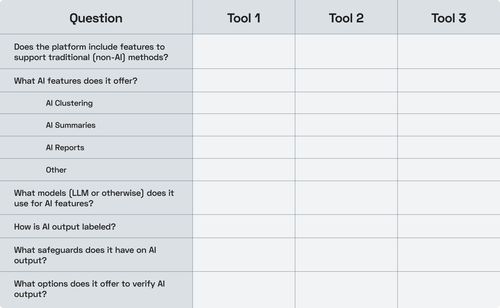
These questions help you evaluate how well AI research tools handle trust, transparency, and safeguards, before you rely on their outputs.
As a research repository, Condens offers a helpful example of what this looks like in practice. The following overview of their safeguards was shared by a company representative and includes some commentary from me:
When AI-powered search is used to look up information that isn’t in the repository, Condens explicitly states that the information isn’t available rather than fabricating an answer. This helps limit the occurrence of hallucinations.
Users can precisely control the scope of raw data that the AI search takes into consideration by using filters in combination with their questions. This is not entirely possible, or at least not as reliable, with LLMs.
Condens uses an evaluation pipeline to surface only the most relevant quotes (to the extent possible using automated judging criteria), and post-processes supporting quotes to ensure that they are accurate and correctly attributed. [Every LLM I’ve tested fabricates quotes or attributions at least occasionally, so having separate infrastructure to tie quotes back to their source is a significant benefit of using a research platform. –LP]
Condens optimizes their model selection and prompts for UX research through evaluation on test data. This helps ensure you aren’t introducing avoidable errors into your analysis. [This is something I recommend that UX researchers do for themselves when working with LLMs directly. –LP]
Condens enforces clear consent and labeling anytime AI-powered features are used, and employs AI only when users have opted in. For example, Condens supports automated tagging with AI-suggested tags rather than auto-tagging everything on its own, keeping the researcher in the drivers seat.
The stakeholder repository in Condens only shows output (AI or otherwise) that’s been researcher-approved.
Safeguards like these can help to significantly reduce the number of AI hallucinations that make it into generated output and can increase AI reliability to ensure greater consistency.
So for those who don’t have the time or expertise to test LLMs for UX research themselves, it may be safer to trust a toolmaker’s setup. Plus, using the same platform across an organization ensures that everyone stays on the same page when it comes to the models and prompts used.
LLM vs. a user research platform is not the only choice that will impact your research reliability, however. It will also be impacted by the specific AI features your team uses.
Different AI features carry different levels of risk when it comes to the likelihood that they’ll produce errors. Some AI capabilities simply retrieve information. Others interpret, summarize, or generate research findings. The more interpretive the feature, the higher the likelihood of errors and the greater the potential impact on research quality, stakeholder trust, and decision-making.
Understanding these differences is essential when evaluating tools for your organization because the feature set that you make available to your team will play a big role in how the analysis process is carried out, and how trustworthy your research results are.
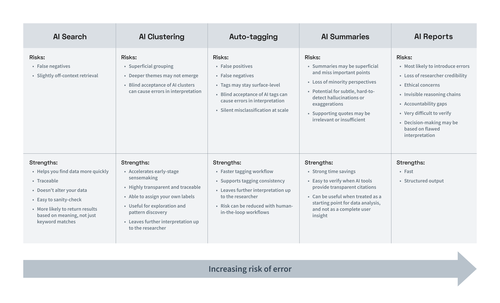
Below is a breakdown of common AI features in user research tools, ranked from lower to higher risk of error.

What it does: Retrieves relevant content based on semantic meaning rather than exact keywords.
One of the simplest ways to apply AI in research analysis is search: finding passages in your data that lexical or keyword search might miss. Using AI in search means the results will most likely match the intent of your query, not just the literal words used.
This is particularly useful when querying your data about specific themes or ideas and wanting to see where else those concepts might appear across your study. AI search can help you surface relevant excerpts more quickly, but you are still the one making the decision about how to interpret and use those results.
This makes AI search relatively low risk overall. The primary risk is that it may still miss relevant information.
Risks:
False negatives (missing relevant insights)
Slightly off-context retrieval
Strengths:
Helps you find data more quickly
Traceable (you can verify sources)
Non-destructive (does not alter your data)
Easy to sanity-check
More likely to return results based on meaning, not just keyword matches
Overall risk level: Low. AI Search is assistive, not interpretive. The human remains fully in control.
What it does: Automatically groups similar notes or quotes into themes.
AI clustering features are usually used in affinity mapping or virtual whiteboards, where the UX research tool automatically groups similar notes, quotes, or highlights from qualitative data. This is typically done using semantic similarity or sentiment analysis and can save you time by eliminating the need to sort sticky notes yourself.
As an exploratory tool, clustering can reveal unexpected connections. However, automatically generated groupings may appear more authoritative than they actually are.
Risks:
Superficial grouping based on wording rather than meaning
Deeper themes may not emerge
Blind acceptance of AI clusters can cause errors in interpretation (especially if cluster titles are AI-generated)
Strengths:
Accelerates early-stage sensemaking
Highly transparent and traceable
Able to assign your own labels
Useful for exploration and pattern discovery
Leaves further interpretation up to the researcher (lower likelihood of fabricated claims)
Overall risk level: Low to moderate. Valuable for exploration, but should not be treated as analytical ground truth.
What it does: Applies tags to qualitative data automatically without explicit validation.
Auto-tagging automatically assigns existing tags to quotes based on semantic similarity. This can save time when processing lengthy transcripts. But automated tagging without human review introduces risk.
AI-assigned tags may be too superficial, overlooking complex or nuanced meanings. This can result in false positives (where irrelevant quotes get incorrectly tagged), or misses (where relevant quotes don’t get tagged).
When tagging gets done incorrectly, it can cause errors in how you interpret your findings.
A safer alternative is AI-suggested tags, where a human must accept or reject each tag provided by the AI.
When tags are simple, well-defined, and reviewed by a human, AI-suggested tags can be an effective way to speed up analysis, while still leaving later sensemaking steps up to the human researcher. However, as automation increases, so does the risk of misclassification and downstream interpretation errors.
Risks:
False positives (irrelevant quotes tagged)
False negatives (relevant quotes missed)
Tags may stay surface-level; not appropriate for complex or nuanced tagging
Blind acceptance of AI tags can cause errors in interpretation (especially if the tags are AI-generated rather than human-created)
Silent misclassification at scale (especially with full automation)
Strengths:
Faster tagging workflow
Supports tagging consistency
Leaves further interpretation up to the researcher (lower likelihood of fabricated claims)
Risk can be reduced with human-in-the-loop workflows (e.g., AI-suggested tags instead of auto-tagging)
Overall risk level: Low to moderate. When tags are applied fully automatically without structured validation, the risk increases. AI tagging can be highly effective, but the presence (or absence) of human oversight is the determining factor in how risky it becomes.
What it does: Generates narrative summaries from transcripts or notes.
AI summaries compress qualitative data into digestible information. This can be helpful for internal communication or early synthesis drafts, but compression introduces interpretive risk.
Even subtle phrasing changes, such as stating that something was “common” rather than “mentioned once”, can materially alter the perceived findings.
Risks:
Summaries may be superficial and miss important points
Loss of minority perspectives
Potential for subtle, hard-to-detect hallucinations or exaggerations
Supporting quotes may be irrelevant or insufficient
Strengths:
Strong time savings
Easy to verify when AI tools provide transparent citations
Can be useful when treated as a starting point for data analysis, and not as a complete user insight
To combat false claims, many AI summary features offer citations, allowing the researcher to view the supporting quotes. Platforms like Condens may also have dedicated infrastructure to ensure that quotes cited are verbatim and correctly attributed, making verification easier.
So AI summary features do involve some risk of superficiality and fabrication, but are generally verifiable with a little additional effort.
Overall risk level: Moderate. Requires validation against original data.
What it does: Synthesizes data across multiple documents and produces structured insights and recommendations.
AI-generated reports simulate multi-step analysis: identifying themes, interpreting patterns, and drawing conclusions across participants. This fulfills the AI promise of instant insights, but at a high cost. Using AI to generate “insights” across multiple documents is riskier than the previously discussed features because:
When LLMs perform more analytical steps, the likelihood of hallucination or oversimplification increases.
They’re harder to verify. AI report generation is prone to hallucination. And because results come from more sources and are meant to simulate a more complex analysis, they require more extensive effort to check.
There’s no way to verify an AI-generated report without doing a substantial level of analysis yourself. So even though the tools themselves may warn you to “verify all details,” it’s extremely cumbersome to do in practice. And the temptation to provide AI Reports as instant research findings to stakeholders can be hard to resist, particularly for team members who haven’t been trained on the risks (this is an ongoing issue in legal research).
So while AI-generated UX research reports are in high demand because of their ease of use, research leaders should think twice before adopting them and making this feature available to their team. Especially when considering how they may be used by novices.
Risks:
Most likely to introduce errors (hallucinations, superficiality, etc.)
Decision-making may be based on flawed interpretation
Loss of researcher credibility
Ethical concerns
Invisible reasoning chains
Accountability gaps
Very difficult to verify
Strengths:
Fast
Structured output
Overall risk level: Very high. Fully autonomous AI-generated reports should not be relied upon for high-stakes research decisions.
Whether you’re using an LLM chatbot or a purpose-built AI UX research tool, errors in AI-powered research analysis are a reality that isn't going away anytime soon. And your AI user research strategy needs to account for this.
Especially when conducting research that can impact critical business decisions, human researchers should still be involved in the user research process every step of the way. Human expertise is essential for validating AI-generated research findings, interpreting nuanced user behaviors, and making informed research decisions that require contextual judgment.
That’s why it’s important to still have access to features in your tools that support human analysis (which actually isn’t possible with some new AI-first UX research tools).
This can also mean setting expectations for how your team will document and report using AI in their research process. I recommend at minimum ensuring that AI results are clearly labeled, and that you establish who’s ultimately accountable for the insights (AI or otherwise) used in any business decisions.
By now, you have a good idea of how the introduction of AI can impact your UX research process. But deciding which AI tool to adopt is as much a question of philosophy as of features.
Many research leaders go into the tool decision with a misconception about what AI can do for their teams. They think of AI as a jet pack for their top-performing researchers: something that’s going to elevate their performance into the stratosphere.
But what the literature shows is that AI isn’t so much a jet pack as it is an across-the-board leveler.
AI assistance has been shown to produce only modest improvements for top performers. Where it may have an outsized impact is for less experienced performers, as in the case of non-researchers, by boosting their performance to “average” levels.
So, in choosing an AI tool for your organization to adopt, don’t just think about your best researcher (who’s likely to perform about the same with or without it). You should also think about a new developer or PM or designer who’s never done research before.
Ask yourself:
What AI UX research tool do you want them using?
What safeguards should guide their work?
How will the AI tool enable them to produce trustworthy, valuable insights?
Current AI trends show that research is unlikely to remain the sole purview of research specialists. So it’s important to think about how you want democratized research to look at your organization, and to choose AI tools for UX research that encourage responsible, meaningful insights from non-researchers, in addition to supporting the needs of research specialists.
Adopting AI responsibly in your user research process is all about understanding the limits of AI, communicating them effectively, and adopting tools and policies that clearly differentiate between AI-generated insights and human-derived insights.
This may look like:
Clarifying where AI is helpful and where it introduces too much risk
Ensuring transparency around when and how AI is used
Defining who is accountable for the insights behind business decisions
Using tools that reinforce healthy UX research habits, not shortcuts
By building these practices early, organizations strengthen the quality of their research and elevate the value of skilled UX researchers.
Artificial intelligence is reshaping UX research in meaningful and sometimes unpredictable ways. And the AI tools organizations choose to use today will shape how they understand their customers tomorrow.
Prioritizing AI efficiency over insights' accuracy and nuance can lead to organizations becoming less differentiated, as they rely more and more on generic AI recommendations.
The better alternative, in my view, is to prioritize research-first tools with built-in guardrails. This can help lay the foundation for welcoming more non-experts who want to do research into the fold, while still preserving the valuable distinction between AI and human-derived insights.

Llewyn enables responsible adoption of AI for research and strategy by product leaders and their teams.
With 15+ years in emerging technology, Llewyn helps organizations navigate AI adoption with clarity and rigor. Her work includes curating Rosenfeld Media’s, Designing with AI conference, and speaking on responsible AI at the Library of Congress, Pratt Institute, and other leading institutions.
